Discover the JetMag Pro system
The JetMag Pro Filter System is designed for photographers and videographers who demand speed, stability, and versatility in their gear. Ideal for landscapes, nightscapes, filmmaking, and more, this system integrates advanced features to streamline your workflow and ensure high-quality results.
Easy to install
- Magnetic Speed with a Snap: JetMag Pro filters’ magnetic design allows for rapid installation and removal.
- Quick and Comfortable Removal: Equipped with two small handles, these filters can be removed comfortably and quickly.
- Easy Identification: Multi-coloured handles help quickly identify different filters in your kit.
Steady
- Rotate, Lock, and Stability: The patented locking design ensures stability by rotating the small handle to the marked position, securely locking multiple filters.
- Multi-Filter Locking: Securely stack and lock multiple filters without compromising stability.
- The JetMag Pro filters use an innovative magnetic attachment with a blocking mechanism
Slim and Versatile
Ultra-Slim Frame for Wide Lenses: Designed to be ultra-slim, JetMag Pro allows two filters on lenses as wide as 15mm without causing vignetting.
- Adaptable to Various Lenses: Compatible with different filter thread lenses using adapters.
- Protective Metal Lens Caps: Front and back metal lens caps can be quickly installed and removed, offering protection for both filters and lenses.
- Range of Filters for Every Scene: Choose from various filters designed for landscapes, portraits, nightscapes, video, and filmmaking.
- Low-Reflective Nano-Coating: Features a low-reflective nano-coating that effectively reduces glare, even when stacking multiple filters.
How to Lock JetMag Pro Filters
Single Filter Lock:
- Install one filter with the coloured handles at 45 degrees from the white lines on the adapter ring.
- Rotate the handles until they are aligned on the white lines on the adapter ring.
- Once the coloured handles are aligned on the white line, the filter is securely locked and cannot be removed.
- Is not necessary to lock the filter while shooting, but we suggest to lock the filters while moving from a location to another in order to secure them properly.
Multi Filter Lock:
- Install more filters with the coloured handles at 45 degrees from the white lines on the adapter ring.
- Align the handles from each filter together and align the whole block on the white lines on the adapter ring.
- Once the coloured handles are aligned on the white line, the filters are securely locked and cannot be removed.
- Is not necessary to lock the filter while shooting, but we suggest to lock the filters while moving from a location to another in order to secure them properly.


How to Unlock JetMag Pro Filters
Single filter unlock:
- Rotate the coloured handles away from the white lines on the adapter ring.
- Remove the filter as this will be unlocked.
Milti-filter unlock:
- Rotate the coloured handles closer to the adapter ring away from the white lines on the adapter ring.
- This way, all the filters will be unlocked, being able to remove the whole filter block.


How to minimise vignetting
The JetMag Pro allows two filters to be used on 15mm without vignetting.
After installation, rotate the small handles about 45 degrees toward the corners of your composition to minimise vignetting as much as possible.


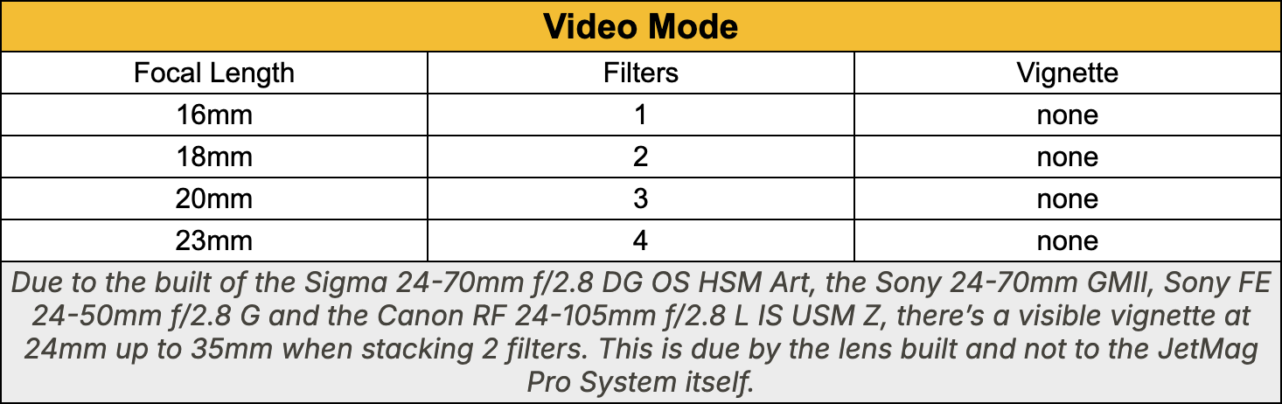
The JetMag Pro VND True Color 1–5 Stop filter is designed specifically for video use, with the vignetting chart shown below:
Installation Tips
JetMag Pro uses a magnetic installation with a locking design. When installing the filter align the handles 45 degrees from the white lock lines on the adapter, then rotate the filter to the lock white lines to firmly lock. For multiple filters, stagger the positions of the small handles on each filter.
Do you have any further questions? Contact us here below:
What our customers says about the JetMag Pro system:


 Verified owner
strong magnetic connection beween filters and caps
 Verified owner
Magnetic connection between filters seems strong with additional advantage of locking. No discernable colour cast on the polariser.
 Verified owner
The whole system seems to work very well. I needed an extra rings (62mm) and picked up a Black Mist filter. The case could do with having a little more capacity, possibly an elasticated section between the zip and the shell to allow for say four to five other filter parts. Everything does just about fit but I’m a little worried that it is very tight and may cause some distortion in the rings.
 Verified owner
The Mag Pro was well packaged and easy to use.
I would of given 5 stars, but the clip on the pouch is poorly located. If you clip the pouch to your belt or tripod the zip is in a downward facing position. This could result in filter getting lost or damaged, I suggest that the clip or mountain position should be redesigned so that the filters don’t potentially fall out and get damaged or lost.
 Verified owner
Excellent products & service. One recent order didn’t arrive by post as expected, so I contacted NiSi as I was hoping to take the item on an upcoming holiday. They immediately re-sent the filter caps by next day courier – can’t ask for more than that !
 Verified owner
The JetMag Pro magnetic filter system is brilliant and so easy to use, the filters work really well too