NiSi JetMag Pro Bundle: Magnetic Variable ND 1-9 Stop 82mm (1-5 Stop VND + 4 Stop FS ND)
The JetMag Pro Filter System is designed for photographers who demand speed, stability, and versatility in their gear. With an innovative magnetic design, ultra-slim frames for wide-angle lenses, and a unique locking mechanism, JetMag Pro ensures that your filters are installed and secured quickly and effortlessly. Ideal for landscapes, nightscapes, filmmaking, and more, this system adapts to various lenses while reducing glare with a specialised nano-coating.
JetMag Pro Vario ND 1-5 Stop + 4 Stop Bundle: Characteristics
- The JetMag pro Vario ND provides transitionless absorption between 1 and 5 stops, without aberrations or the X-Cross effect.
- Add the 4-stop FS ND in front of the Vario ND 1-5 to have 5 to 9 stops, which is convenient and of the best quality possible.
- You can always use the 4-stop FS ND alone or mount it on another lens (remember to add an extra adapter to the bundle!).
- All NiSi JetMag Pro filters use a proprietary Optical Glass for the best quality.
- All NiSi JetMag Pro filters have Nano Coating®, anti-reflective coatings and proprietary films for CPL and Variable ND
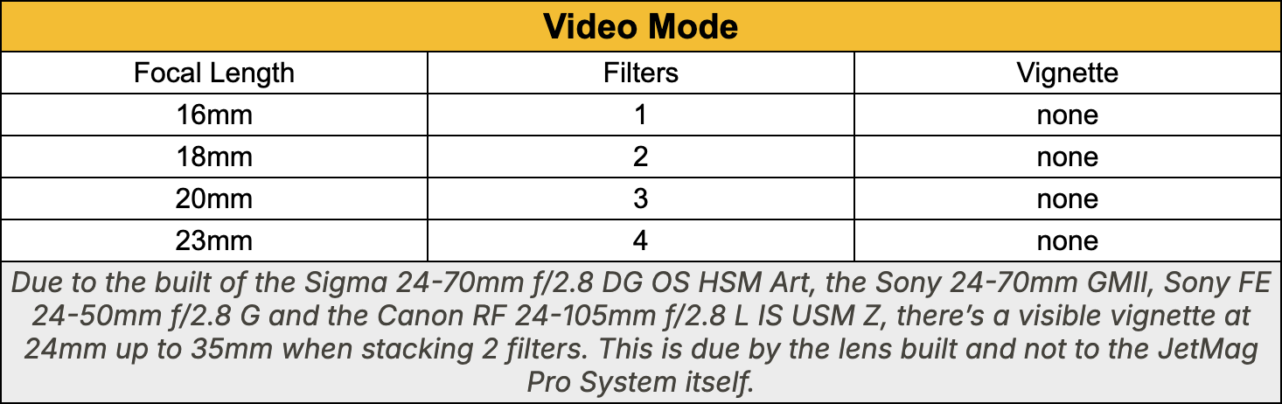
Due to the built of the Sigma 24-70mm f/2.8 DG OS HSM Art, the Sony 24-70mm GMII and the Canon RF 24-105mm f/2.8 L IS USM Z, there’s a visible vignette at 24mm up to 35mm when stacking 2 filters. This is due by the lens built and not to the JetMag Pro System itself.
How it works: JetMag Pro Magnetic Variable ND 1-9 Stop Bundle
- The bundle includes 1x Magnetic Variable ND size 82mm
- 1x ND 4 Stops size 82mm
- Add at least 1 and up to 4 adapter rings for the lenses you want to use your NiSi Vario ND on
- Add Front caps NB: We recommend having one front cap for each lens you frequently use with a mounted ring, plus another one to protect filters in the bag. (50% off with the bundle!)
- Add Back cap. NB: One rear cap is usually enough if you want to stack filters and protect them in the bag. If you want to create multiple stacks, you need multiple back caps. (50% off with the bundle!)
- The pouch is always included for free!
JetMag Pro main features
Locking design: Thanks to our patented design, aligning the handles with the white line on the rings will mechanically lock the filters for added security and more precise handling.

Ultra-Slim Frame for Wide Lenses: Designed to be ultra-slim, JetMag Pro allows two filters on lenses as wide as 15mm without causing vignetting.
Versatility and speed without compromises
- Adaptable to Various Lenses: Compatible with different filter thread lenses using adapters.
- Protective Metal Lens Caps: Front and back metal lens caps can be quickly installed and removed, offering protection for both filters and lenses.
- Range of Filters for Every Scene: Choose from various filters designed for landscapes, portraits, nightscapes, video, and filmmaking.
- Low-Reflective Nano-Coating: Features a low-reflective nano-coating that effectively reduces glare, even when stacking multiple filters.
How to Lock JetMag Pro Filters
Single Filter Lock: Install a filter with the handles 45 degrees from the white lines on the adapter. Rotate the small handles until they align with the white lock line. Once aligned, the filter is securely locked and cannot be removed.
Multi Filter Lock: Install multiple filters with the handles 45 degrees from the white lines on the adapters. Align the small handles of each filter frame and rotate them together to match the white lock line on the adapter. When the handles are aligned, the filters are securely locked to each other.

How to Unlock JetMag Pro Filters
Single Filter Unlock: Rotate the small handles 45 degrees away from the white lock line on the adapter. This will unlock the filter, allowing it to be detached.

Multi Filter Unlock: Rotate the small handle of the rear filter connected to the adapter 45 degrees from the white lock lines that indicate the lock. This will unlock the stacked filters, enabling them to be disassembled together. By rotating the handles of each filter 45 degrees, they will unlock and can be detached.

Installation Tips
JetMag Pro uses a magnetic installation with a locking design. When installing the filter align the handles 45 degrees from the white lock lines on the adapter, then rotate the filter to the lock white lines to firmly lock. For multiple filters, stagger the positions of the small handles on each filter.

How to minimise vignetting
The JetMag Pro VND True Color 1–5 Stop filter is designed specifically for video use, with the vignetting chart shown below: